 3057701ac1
- Add SQLite database package for hashrate history persistence with configurable retention
- Enhance dashboard with responsive stats bar, improved chart component, and worker selector
- Add terminal modal component for console output viewing
- Implement comprehensive E2E test suite with page objects pattern
- Add history API endpoints for historical data queries
- Update worker message handling with proper registration
- Add new UI pages structure with layouts and components
- Update Docker configuration for Go 1.24
- Add PostCSS configuration for Tailwind CSS processing

🤖 Generated with [Claude Code](https://claude.com/claude-code)

Co-Authored-By: Claude Opus 4.5 <noreply@anthropic.com>
2.4 KiB
2.4 KiB
Screenshots
A visual tour of the Mining Dashboard interface.
Dashboard
The main monitoring view showing real-time hashrate graphs and statistics.

Features shown:
- Stats bar with hashrate, shares, uptime, pool, avg difficulty, workers
- Hashrate chart with time range selector
- Quick stat cards (peak, efficiency, share time, difficulty)
- Worker selector dropdown
Profiles
Manage your mining configurations with profile cards.

Features shown:
- Profile cards with name, miner type, pool, wallet
- Start button to launch miner
- Edit and delete actions
- New Profile button
New Profile Form
Create a new mining configuration.

Features shown:
- Profile name input
- Miner type selector
- Pool address field
- Wallet address field
- TLS and Huge Pages toggles
Workers
View and manage running miner instances.

Features shown:
- Profile dropdown to start new miners
- Empty state when no miners running
- Start button
Console
Live terminal output with ANSI color support.

Features shown:
- Worker dropdown selector
- Terminal output area
- Command input field
- Auto-scroll toggle
- Clear button
Miners
Install and manage mining software.

Features shown:
- XMRig card (installed) with version and algorithms
- TT-Miner card with Install button
- System information panel
- Uninstall option for installed miners
Pools
View connected mining pool information.

Features shown:
- Pool list from running miners
- Empty state when not mining
Nodes (P2P)
Manage peer-to-peer connections for multi-node setups.
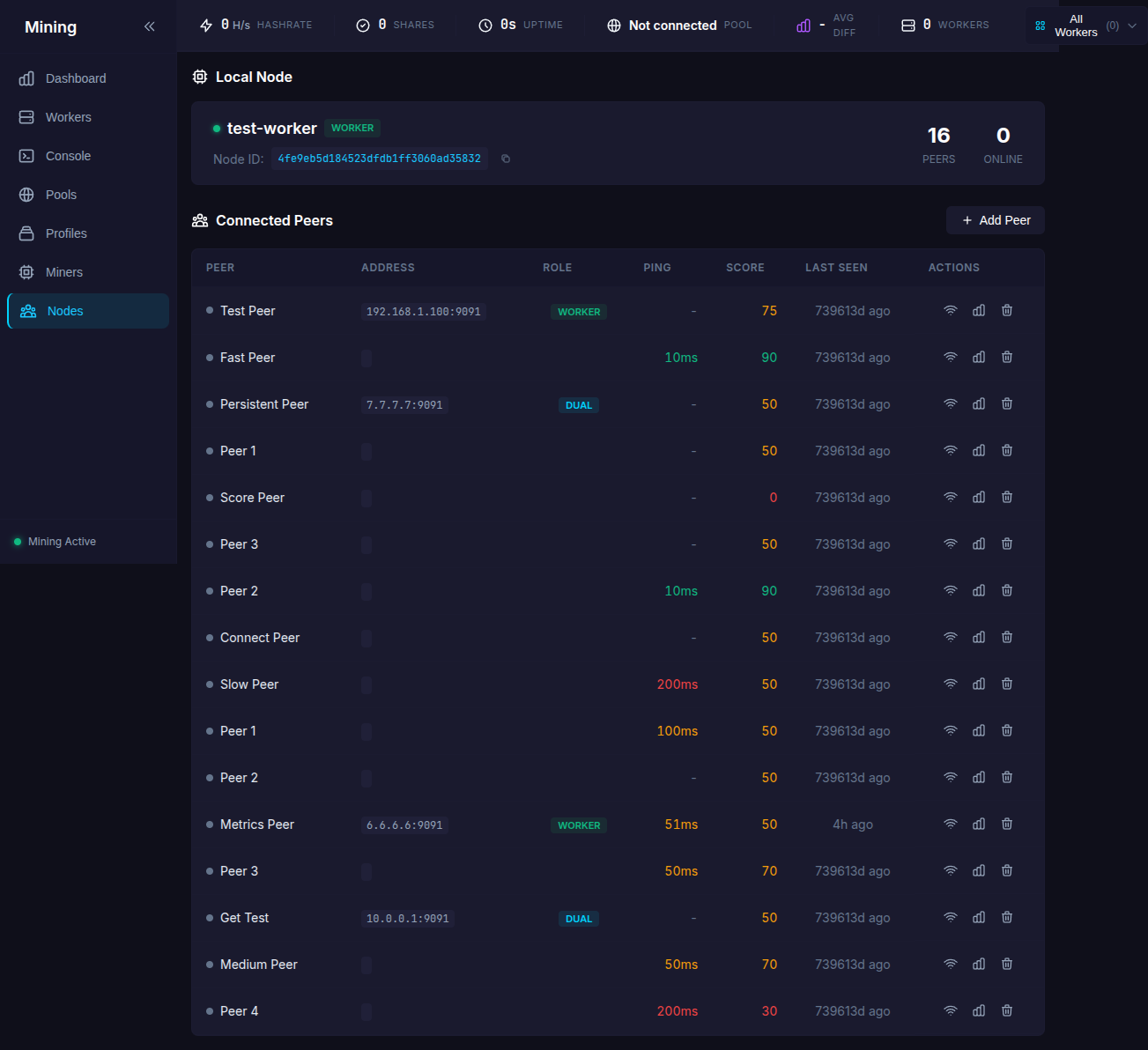
Features shown:
- Local node identity card
- Node ID with copy button
- Peer/Online counters
- Connected peers table with ping, score, last seen
- Add Peer button
- Ping, View Stats, Remove actions per peer
Theme
The interface uses a dark theme with:
- Background: Dark slate (#0a0a12)
- Cards: Slightly lighter slate
- Accent: Cyan and lime highlights
- Text: White and gray variants
- Status colors: Green (success), Red (error), Yellow (warning)